FAQs
NC State vs. NCSU
How should I address the University?
In general usage, the recommended naming is “NC State University.” Other options can be “NC State,” or “North Carolina State University.” The official full name of “North Carolina State University at Raleigh” is to be avoided, due to the implication that there’s another NC State somewhere else.
Can I use “NCSU”?
Under no circumstances, with the exception of a url (ncsu.edu) should “NCSU” be used, either internally or publicly.
Why not?
Back in the 2000s, NC State did some market research on the name recognition of “NCSU” vs. “NC State.” What we discovered was that “NC State” had good name recognition across the country, but “NCSU” was not well-known or well-understood outside the South. At the time, we were trying to strengthen our brand by paring down the multitude of ways you could refer to the university, so that was the origin of our decision to save “North Carolina State University” for super-formal occasions, like commencement and Founders’ Day, because it’s the most cumbersome of our names; to call ourselves “NC State” or “NC State University” the vast majority of the time; and to eliminate “NCSU” altogether as the weakest form of our name.
That’s why NCSU is never to be used in any communications intended for any public audience, whether internal or external. To make sure members of our community get in the habit of using on-brand terminology, we prefer that people refrain from using NCSU even in emails within the university or on platforms like Slack. Besides, once it’s on the internet in any form, there’s no telling who may eventually see it.
Department and Corporate Logos
What logo should I use for the department?
The department’s official logotype is the University Brick, flanked on the right by the text “Electrical and Computer Engineering”. The official variants of that are available at go.ncsu.edu/ece-brand
Can I use the old diode ECE logo?
No.
Can I just recreate the NC State brick logo or the ECE logo myself?
No. The spacing, coloring, and fonts used are all part of the official brand and should never be adjusted/changed.
What logo can I use for the University?
Go to brand.ncsu.edu/logo to see and download all the options.
Note that the “block S” logo is not to be used by academic units – it’s reserved for student/alumni spirit and athletics. Similarly, the chancellor’s seal (with the Bell Tower) is only allowed for official communications from the Chancellor’s Office.
My group is sponsored or working with another company, can we use their logo in print or on the web?
You must ensure that you have explicit permission from the company to use their logo – just because you may be working with them or using their product does not imply consent to use their logo on any University communication.
Can I use the Department Logo on merchandise (like a shirt or cup)?
As the Department Logo includes the University’s trademark, it is subject to royalties, and can only be produced by licensed manufacturers. See Trademark Licensing for more information.
Other Notes
Licenses of the official font (Univers) are limited to official communication roles. If you do not have Univers, you should be using Arial as the font in any official/departmental use.
The official colors are available at brand.ncsu.edu/color and should always be used exclusively and specifically.
The “Circuit Wolf” which is used on Department social media is not an official logo and should not be used in place of the official logotype. It can however be used as a graphic accent or symbol for the department – email ece-webmaster@ncsu.edu to use the Circuit Wolf.
Email Signatures
The brand-approved email signature looks like this:
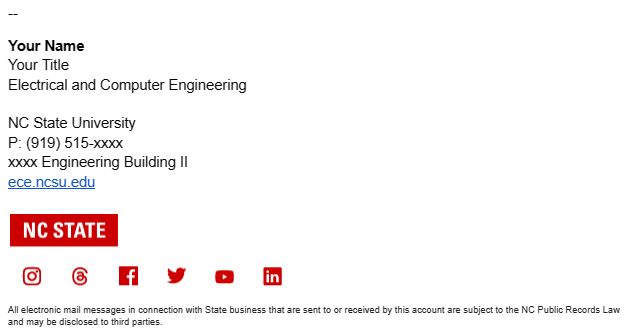
You can copy/paste it from the link below to add it to your Gmail Signature.
Edit the social media links and other details to match your department.
Click on an icon to select it, and then click the Link button. In the “Edit Link” box that appears, paste the URL for the channel the icon represents into the “Web address” field and click “OK.” Do this with each icon in turn, until each icon links to its respective channel. Don’t include the icons in your signature without linking them in this way. Once you have updated the icons in your signature and clicked “Save Changes,” send a test email to ensure the links are working correctly.
Wikipedia Pages for Faculty
Have you gotten a solicitation from an agency looking to boost your profile and reputation by sourcing you a Wikipedia page? You’re not alone, and no, it’s typically not legitimate.
Doing the things these agencies want to do is often against the terms of service of Wikipedia, and in the vast majority of cases, you aren’t eligible for a Wikipedia page.
While Wikipedia is nice, it isn’t a definitive source. Furthermore, the information it would provide on our faculty should already be captured by our profile pages, which we generally want to be at the top of search results anyway–we would much rather get someone looking for John Smith to wind up on the ECE site, and then start clicking away than have them end up on Wikipedia and go down a non-NC State rabbit hole.
Ignoring the administrative challenges of keeping Wikipedia pages updated and accurate (and we do have a few faculty with Wikipedia pages that we occasionally update with honors, etc, and there are probably more updates that can be done (by anyone)), not all (in fact, few) of our faculty meet the criteria for having articles on Wikipedia, per their published criteria.
Additionally, any edit made by an employee of the university must disclose that it is being done so as an employee (COI disclosure), which would draw further scrutiny and require meticulous external sourcing (e.g.: we can’t really cite the ECE website for everything) of every claim—furthermore, we cannot edit a Wikipedia page as “NC State ECE”, but rather have to edit it as a unique individual.
The account is yours, not your employer’s.Wikipedia
There is no service at the university doing Wikipedia maintenance, simply because most folks are not eligible for Wiki pages. Note that, per their rules, you are also “strongly discouraged” from creating your own page as that’s a conflict of interest.
Even Wikipedia helpfully has a page dedicated to institutional editing/creating of Wikipedia pages.
The following is verbatim from Wikipedia’s criteria for academics.
Criteria
Academics meeting any one of the following conditions, as substantiated through reliable sources, are notable. Academics meeting none of these conditions may still be notable if they meet the conditions of WP:BIO or other notability criteria. The merits of an article on the academic will depend largely on the extent to which it is verifiable. Before applying these criteria, see the General notes and Specific criteria notes sections, which follow.
- The person’s research has had a significant impact in their scholarly discipline, broadly construed, as demonstrated by independent reliable sources.
- The person has received a highly prestigious academic award or honor at a national or international level.
- The person has been an elected member of a highly selective and prestigious scholarly society or association (e.g., a National Academy of Sciences or the Royal Society) or a fellow of a major scholarly society which reserves fellow status as a highly selective honor (e.g., Fellow of the Institute of Electrical and Electronics Engineers or Honorary Fellow of the Institute of Physics).
- The person’s academic work has made a significant impact in the area of higher education, affecting a substantial number of academic institutions.
- The person has held a named chair appointment or distinguished professor appointment at a major institution of higher education and research, or an equivalent position in countries where named chairs are uncommon.
- The person has held a highest-level elected or appointed administrative post at a major academic institution or major academic society.
- The person has had a substantial impact outside academia in their academic capacity.
- The person has been the head or chief editor of a major, well-established academic journal in their subject area.
General notes
- An article’s assertion that the subject passes this guideline is not sufficient. Every topic on Wikipedia must have sources that comply with Wikipedia:Verifiability. Major awards must be confirmed, claims of impact must be substantiated by independent statements, reviews, citation metrics, or library holdings, and so on.
- Once the passage of one or more notability criteria has been verified through independent sources, or through the reliable sources listed explicitly for this purpose in the specific criteria notes, non-independent sources, such as official institutional and professional sources, are widely accepted as reliable sourcing for routine, uncontroversial details.
- The criteria above are sometimes summed up as an “Average Professor Test”: When judged against the average impact of a researcher in a given field, does this researcher stand out as clearly more notable or more accomplished?
- Note that this is a guideline and not a rule; exceptions may exist. Some academics may not meet any of these criteria, but may still be notable for their academic work. It is very difficult to make clear requirements in terms of number/quality of publications. The criteria, in practice, vary greatly by field and are determined by precedent and consensus. Also, this guideline sets the bar fairly low, which is natural; to a degree, academics live in the public arena, trying to influence others with their ideas. It is natural that successful ones should be considered notable.
Set Work Location on Calendar
Add your working location
- On your computer, open Google Calendar.
- Create an all-day event. Learn how to create an all-day event.
- In the event window that appears, select Working location.
- Optional: Adjust the dates that you want to add a working location to.
- Select a location or create a new one.
- Click Save.
Tip: You can also add a working location when you point below a date on your calendar grid and click the “Add location” bar that appears.
Edit your working location for one day
Important: When your calendar is shared with someone with free or busy visibility, they can view your availability and working location.
- On your computer, open Google Calendar.
- Below a specific date on your calendar grid, click the location bar.
- If you click on the starting location, click Edit working location
.
- To adjust the date range, click on each date.
- Select a location or create a new one.
- If you click on the starting location, click Edit working location
- Click Save.
- Choose a frequency, and then click OK.
Add your working location for part of a day
- On your computer, open Google Calendar.
- Click an empty space on your calendar.
- At the top of the event, click Working location.
- Choose the time and date you want to add a working location.
- Optional: Make your working location repeat.
- Click the day and time.
- Next to “Does not repeat,” click the Down arrow
.
- Choose how often you want the event to repeat and end.
- Choose a location or add a new one.
- Click Save.
Tip:
- After you create a working location for part of your day, you can drag it to another date or time.
- You can set your working location to repeat. Learn how to make an existing event repeat.
Show when you’re out of office
When you indicate that you’re out of office, your calendar will automatically decline all meetings during that time.
- On your computer, open Google Calendar.
- At the top of your calendar, click the first date you’ll be out of the office.
- Click Out of office.
- Select the dates that you’ll be out of the office. You can also specify a time.
- Optional: To schedule out-of-office events that repeat, below the day and time you select, click the drop down menu next to “Does not repeat”
choose a frequency.
- Optional: Change your decline settings and edit your decline message.
- Click Save.