ECE Space Reservations
Partner Events
If you are requesting room space to host an event with a corporation or industry partner, please direct those requests to ECE Corporate Relations at ece-corporate@ncsu.edu
ECE Teaching Labs
If you are requesting access to one of the ECE Teaching Labs for your course, workshop, or office hours, please direct those requests to ecehelp@ncsu.edu. Please sure to have reviewed the Lab Schedules ahead of time.
ECE Meeting Rooms

“Drop-in” meetings to any of the conference rooms are allowed, but reservations take precedence over drop-ins. A student with a reservation trumps a senior Faculty member who has “dropped in”. For details on room technology, consult the tabletop signage in the rooms, or peruse our Room Technology page.
All reservations are self-made and are open to all NC State users. There’s no need to call anyone to make a reservation (we’ll just point you here).
Be a good neighbor—please cancel any reservations when not needed in order to free the room up for others to use; and limit repeating reservations to one semester at a time (when choosing to make a repeating reservation, click on Custom, and choose an end date at the end of the semester.
Meetings for unreasonably large blocks of time (eg: 2+ hrs) are not permitted to ensure equitable access to this limited resource.
Meeting room reservations that consistently do not follow these guidelines will be canceled periodically.
How to Reserve
Step 1: Open your Google Calendar
Log in to your NC State Gmail account and open your Google Calendar by either clicking “Calendar” (in the Google+ bar) or by going to Google Calendar
Step 2: Select a time
Click on the desired meeting time in your Google calendar. Then, give the meeting a name and click “More options”.
Step 3: Edit the event
Edit the meeting information as needed. On the right, add your guests (if any), by typing in their name and selecting them from the list.
Step 4: Add room
Click on “Rooms, etc,” and type “ECE” into the filter box to show our rooms. If one of the rooms above isn’t showing, its because its already booked. Then click “Add” to reserve your desired room. Be sure to “save” your event.
Step 5: Reoccurrence
If the meeting is reoccurring, select “Custom” and choose an end date at the end of the semester. Repeating reservations should be limited to one semester at a time.
The department controls 13 different meeting rooms in Engineering Building 2 (EB2) and the Monteith Research Center (MRC):

2055 EB2 Meeting Room
8 people
TV for presentations plus conference phone. Kaptivo whiteboard capture/sharing and Meeting Owl for hybrid meetings.
- Apple TV
- Meeting Owl Camera
- Whiteboard Capture

3053 EB2 Meeting Room
8 people
This small meeting room has a TV for presentations, along with Kaptivo whiteboard capture/sharing and Meeting Owl for hybrid meetings.
- Apple TV
- Meeting Owl Camera
- Whiteboard Capture
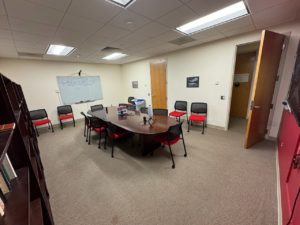
2095 EB2 Conference Room
16 people
The ECE Library Zoom Room hosts a TV for presentations, along with Kaptivo whiteboard capture/sharing and Meeting Owl for hybrid meetings.
- Meeting Owl Camera
- Whiteboard Capture
- Zoom Room

2077 EB2 Meeting Room
8 people
This small meeting room has a TV for presentations, along with Kaptivo whiteboard capture/sharing and Meeting Owl for hybrid meetings.
NOTE: Whiteboards coming soon…
- Apple TV
- Meeting Owl Camera
- Whiteboard Capture

3075 EB2 Meeting Room
8 people
This small meeting room has a TV for presentations, along with Kaptivo whiteboard capture/sharing and Meeting Owl for hybrid meetings.
- Apple TV
- Meeting Owl Camera
- Whiteboard Capture

3110 EB2 Administrative Conference Room
16 people
This room is reserved for primary use by ECE departmental leadership. Use of the room must be requested from Kathy Ford or Abby McGlamery.
The ECE Main Office Administrative board room is a Zoom Room, with TV for presentations, speakerphone, Kaptivo whiteboard capture/sharing and Meeting Owl for hybrid meetings.
- Meeting Owl Camera
- Whiteboard Capture
- Zoom Room
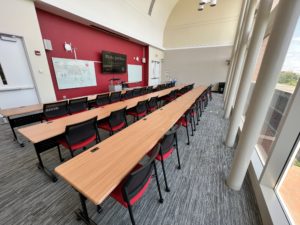
3001 EB2 Seminar Room
37 people
This room has a large TV for presentations, podium, and twin whiteboards. Reconfigurable seating for up to 41 people in classroom, active learning, and meeting configurations. Zoom Room with both podium capture and audience capture. Note that ECE seminars and departmental functions take priority in this space.
- Whiteboard Capture
- Zoom Room

MRC 300 Meeting Area
8 people
This open-air corner meeting room has a TV for presentations.
- Apple TV


MRC 337 Conference Room
15 people
This meeting room has a TV for presentations, U-shaped configuration, along with Kaptivo whiteboard capture/sharing and Meeting Owl for hybrid meetings.
- Apple TV
- Meeting Owl Camera
- Whiteboard Capture

MRC 423D Meeting Room
10 people
This meeting room has a TV for presentations along with Kaptivo whiteboard capture/sharing and Meeting Owl for hybrid meetings.
- Apple TV
- Meeting Owl Camera
- Whiteboard Capture

MRC 400 Meeting Area
8 people
This open-air corner meeting room has a TV for presentations.
- Apple TV

MRC 416A Meeting Area
8 people
This open-air corner meeting room has a TV for presentations.
- Apple TV
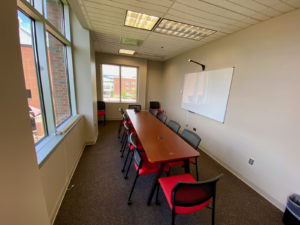
MRC 423C Conference Room
12 people
This meeting room has a TV for presentations, a desk phone, along with Kaptivo whiteboard capture/sharing and Meeting Owl for hybrid meetings.
- Apple TV
- Conference Phone
- Meeting Owl Camera
- Whiteboard Capture
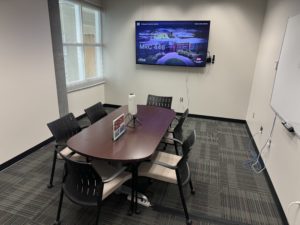
MRC 446 Conference Room
6 people
This meeting room has a TV for presentations along with Kaptivo whiteboard capture/sharing and Meeting Owl for hybrid meetings.
- Apple TV
- Meeting Owl Camera
- Whiteboard Capture